Microsoft 365 Copilot is quickly becoming a core tool for law firms and legal departments, helping professionals draft documents, summarize meetings, and analyze information more efficiently.
Still, not every task is suited to quick answers.
Many tasks need deeper analysis, structured reasoning, and specific guidance. Microsoft designed Copilot’s Think Deeper feature for these scenarios.
What Is the Think Deeper Feature in Microsoft 365 Copilot?
Think Deeper lets Microsoft 365 Copilot spend extra time analyzing a request. Instead of focusing on speed, Copilot creates detailed, structured answers.
This added depth becomes especially valuable when addressing complex questions or tasks that involve multiple considerations, connecting Copilot’s capabilities to real-world needs.
Think Deeper can be useful when you are:
- Planning a project or initiative
- Evaluating different approaches or options
- Working through complex or multi-step problems
- Requesting analysis or structured explanations
When you let Copilot analyze more deeply, you get clearer direction and better insights.
What to Expect When Using Think Deeper
When you use Think Deeper, Copilot responses typically offer:
- More thoughtful and well-developed answers
- Improved handling of complex or layered questions
- Clearer explanations and supporting reasoning
- Suggested next steps to move work forward
Copilot responses may take a bit longer because it spends more time analyzing your request. This extra time leads to more comprehensive, structured results.
Use Think Deeper to shift from fast answers to reliable, thoughtful guidance for tasks that need deeper thinking.
How to Use the Think Deeper Feature in Copilot
To activate Think Deeper:
- Open Microsoft 365 Copilot.
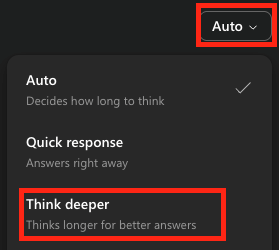
- Select the Auto dropdown menu.
- Choose Think Deeper before entering your prompt.
- Enter your question or task request.
Copilot will analyze your prompt longer and then provide a more structured, comprehensive response.
Why This Matters for Law Firms
Legal professionals frequently need careful analysis, planning, and structured reasoning. Reviewing information, evaluating options, and outlining next steps all benefit from tools that support deeper thinking.
Think Deeper shows how AI is moving beyond automation to help with complex professional work.
For law firms already using Microsoft 365, learning how to leverage these advanced features can help teams get greater value from the technology they rely on every day.
Innovative Computing Systems works with law firms and legal departments to implement and support secure, efficient technology environments — including Microsoft 365 solutions that improve productivity, collaboration, and operational efficiency.
Getting More Value from Microsoft 365
AI tools evolve rapidly. Teams that apply them effectively benefit most. Using Think Deeper shows how small changes in technology use can improve results.
If your firm is exploring Microsoft 365 Copilot or other productivity tools, the right strategy and guidance can help ensure those tools are implemented securely and used effectively across your organization. Contact an Innovative Account Executive. We’ve got your back.